
|
| |||||||
| Register | FAQ | The Twelve Commandments | Members List | Calendar | Arcade | Find the Best VPN | Today's Posts | Search |
| Open Discussion topics Discuss the time of day, whatever you want to. This is the hangout area. If you have LimeWire problems, post them here too. |
| | LinkBack | Thread Tools | Display Modes |
 March 1st, 2005
| ||||
| ||||
 VLC has in-built codecs & divX also plays avi files. For links see: VLC media player - Overview (choose nearest mirror site) OR Class not registered/Codecs - Gnutella Forums To make an application default for particular type of file, select it (outside of LW), go to menu File>Properties>Change Open with ... & choose the program (eg: VLC) & choose always open with. Press OK, Apply & OK. In the example below my system thought all my video files were WinAmp. Doh!  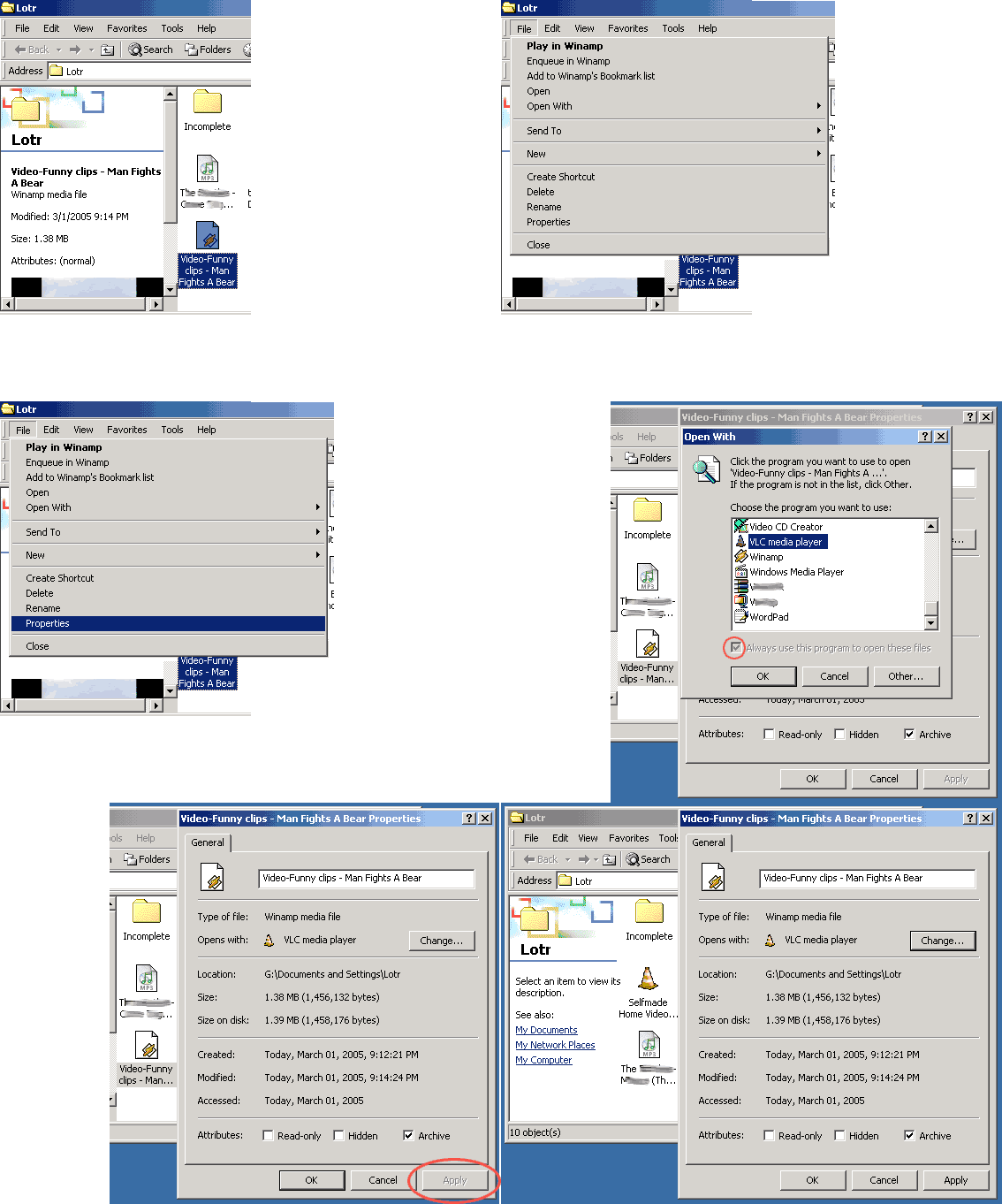 Last edited by Lord of the Rings; May 28th, 2008 at 12:52 AM.  |
| |
 Similar Threads
 | ||||
| Thread | Thread Starter | Forum | Replies | Last Post |
| video will not preview | lowrider | Download/Upload Problems | 2 | November 9th, 2006 12:33 PM |
| Video Preview | chewwie | Download/Upload Problems | 4 | August 29th, 2006 03:56 AM |
| No Video preview how do i make my preview wmp again?? | Seth_151 | General Windows Support | 1 | August 14th, 2006 01:03 PM |
| How do I launch or preview a video file without creating a preview file | Blue as in the mirror | Open Discussion topics | 1 | July 19th, 2006 12:55 PM |
| Preview a video! | cnico88 | General Windows Support | 4 | March 13th, 2005 09:51 PM |


 Threaded Mode


